LEON

SOS · Live 24/7

LEON Panic Button

One press. A LEON agent and your contacts are alerted with your live position.

1 press to alertLive position shared24/7 LEON control room

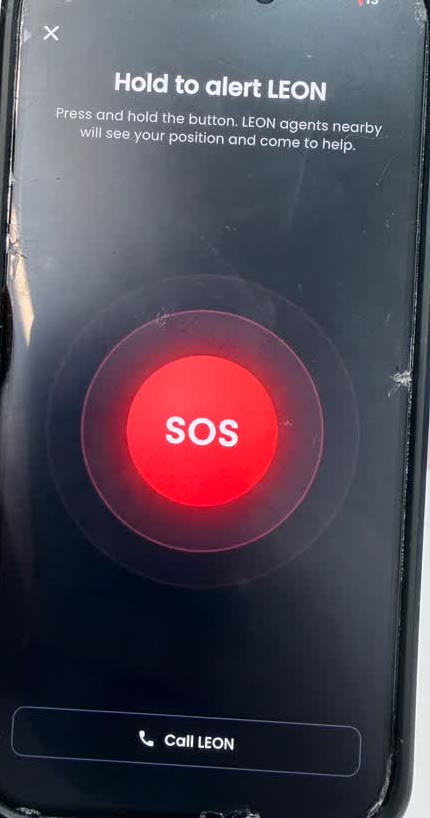
LEON app SOS screen: hold to alert LEON, nearby agents will see your position

How it works

Be prepared in one press

Add the LEON panic button to your phone, your child’s phone or your team’s phones. If something goes wrong, here is what happens.

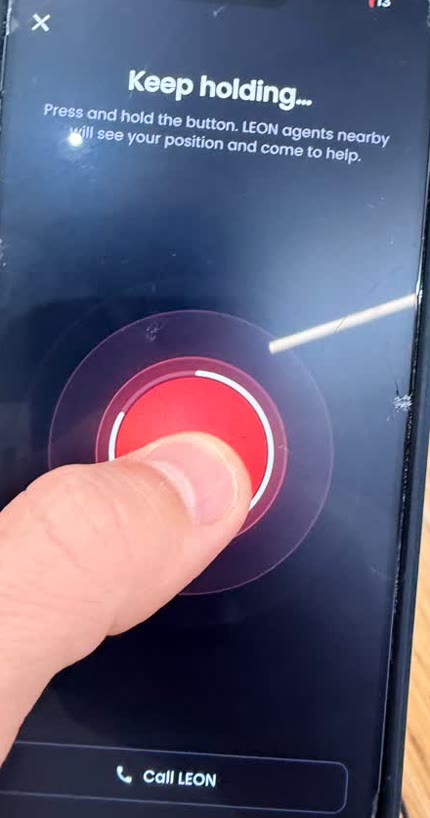
  1. 01Press and hold the buttonHold the red SOS button for a second. The hold stops accidental alerts from a pocket or a bag.
    LEON app: hold the red SOS button to alert LEON

    Open the LEON app and keep your finger on SOS. The rings fill up while you hold, so a bump in a bag or a pocket never sends an alert.

    A child can do it without unlocking a long menu: the button is the first thing on the screen.

  2. 02Your location is shared liveThe moment the alert goes, LEON sees where you are and follows you if you move.
    Holding the red SOS button in the LEON app until the alert is sent

    Your live position goes to the LEON control room and keeps updating while the alert is open: if you are walking, in a car or being followed, we see it move.

    Nothing is shared outside an alert.

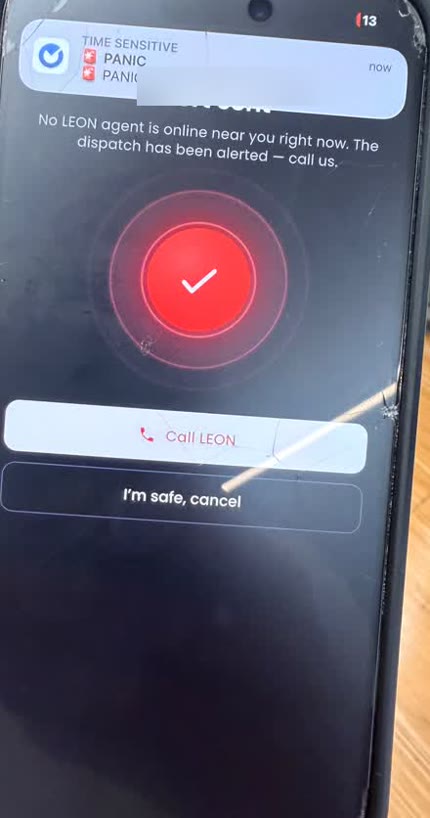
  3. 03The control room calls you back and alerts your contactsA LEON operator calls you within seconds and your contacts are told what is happening.
    LEON app after an SOS alert: dispatch alerted, Call LEON and I’m safe buttons

    A LEON operator calls the phone that raised the alert to understand the situation, and keeps the line open if you cannot speak freely.

    The contacts on your plan (a parent, your family, the shop manager) are alerted at the same time. From the same screen you can call LEON, or close the alert with “I’m safe”.

  4. 04An agent is dispatched when neededIf the situation calls for it, the nearest LEON agent comes to you, and we call 112 / 17 / 15 with you.
    LEON app alert screen with the Call LEON button

    LEON agents nearby see your position and come to help. If there is a risk to life, the operator calls the emergency services with you and stays on until help arrives.

    Every alert ends with a short report so you know exactly what happened.

Agent dispatch depends on where you are and which LEON agents are on duty nearby. The control-room call-back works wherever your phone has a data connection.

Choose your protection

Three ways to have LEON on call

One app, one button. Pick who it protects.

For one child

Kids

€10/ month

Put the button on your child’s phone. Bullying at school, a bad moment on the way home, someone who follows them: they press, we assist them and call you.

  • One child’s phone
  • Live position while the alert is open
  • LEON call-back to your child, then to you
  • Parent alerted at the same moment
  • Agent dispatched when needed

B2B · shops, restaurants, offices

Business

€1,000/ month

For the most critical moment of the day: closing time, when it is dark and your employees are at risk. A LEON security agent passes by every day at closing to assist your team.

  • Unlimited staff phones
  • A LEON security agent on site every day at closing time
  • Priority call-back and dispatch for your site
  • Incident reports after every alert and visit
  • One contact person and monthly invoice

Questions before you choose? Call +33 6 08 70 25 80 or write to [email protected].

The LEON panic button does not replace the public emergency numbers. In a life-threatening emergency, call 112 in Europe, 17 (police) or 15 (ambulance) in France, 999 in the UAE. When you press SOS, LEON calls them with you if needed.

FAQ

Panic button: your questions

Where does the panic button work?

The button works wherever your phone has a mobile data or Wi-Fi connection: the alert, your live position and the call-back from the LEON control room work everywhere. LEON agents are dispatched in the areas where LEON operates (French Riviera, Monaco, Paris and our other cities); elsewhere, we alert your contacts and call the local emergency services with you.

What happens if there is no network?

The alert needs a data connection to reach LEON. If it cannot be sent, the app shows it, and the Call LEON button on the same screen places a normal phone call to the control room. In that case also call 112, which works on any network in Europe.

Does it replace 112, 17 or 15?

No. The LEON panic button is an extra layer, not a replacement for the emergency services. If there is a risk to life, the LEON operator calls 112, 17 or 15 with you and stays on the line until help arrives.

What happens to my data and my location?

Your position is shared only while an alert is open, and only with the LEON control room, the agents handling the alert and the contacts on your plan. It is not sold or used for advertising, and you can ask us to delete your data at any time by writing to [email protected].

How do I add family members or employees?

After you subscribe, each person installs the LEON app with their own phone number. Send us the numbers (or add them from your account) and we link them to your plan: up to 6 phones for Family, as many as you need for Business.

One press. LEON is on the way.

Install the app, choose your plan, and the button is ready on every phone you protect.